Messaging
Slack, Messages, Discord, Telegram, WhatsApp
Casual wording, and no sign-off added.
Dictation for Mac
hushtype types what you say into whatever app you're using. Speech recognition runs on your Mac, so your voice never leaves it.
For Macs with Apple silicon on macOS 14 or later. Windows and iPhone are coming.
How it works
Four steps run in order. Each one has a fallback, so you never lose what you said.
Parakeet V3 turns your audio into text on the Mac itself. On an M1 Max it transcribed an 11-second clip in half a second.
A language model drops fillers and false starts and fixes punctuation. Use Ollama on your Mac or any OpenAI-compatible server. No answer within 2.5 seconds means you get the raw transcript.
Names and terms from your dictionary come out right. Replacements run last, so "open claw" always becomes OpenClaw.
The text lands where you were typing. If an app refuses the paste, hushtype leaves the text on your clipboard and tells you.
Cleanup
These come from hushtype's cleanup tests. With qwen3:8b it gets 27 of the 30 right. When an edit fails hushtype's checks, you get exactly what you said instead.
Modes
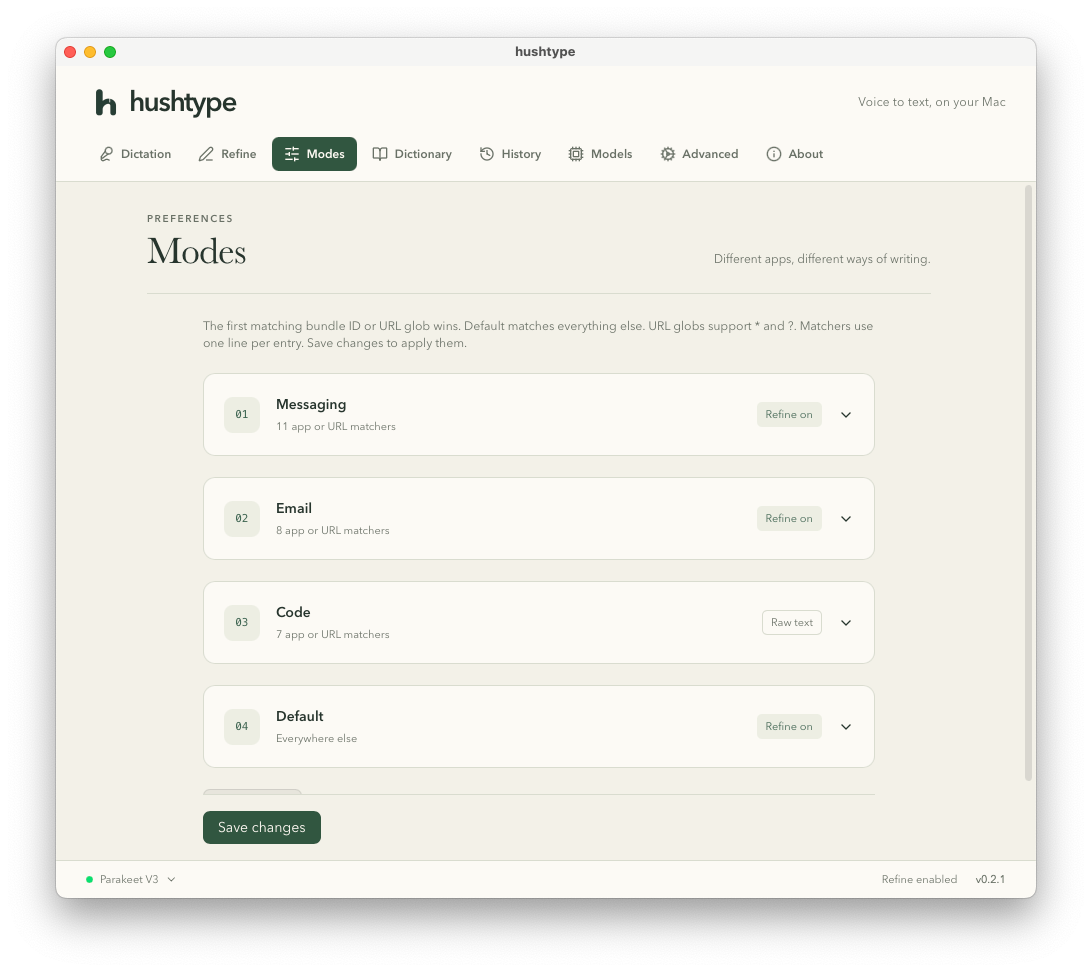
When you start talking, hushtype checks which app is in front and picks a mode. Modes match by app or by web address, and you can add your own.
Slack, Messages, Discord, Telegram, WhatsApp
Casual wording, and no sign-off added.
Mail, Gmail, Outlook, Superhuman
Complete sentences and paragraphs.
Cursor, VS Code, Xcode, Terminal, iTerm, Warp, Ghostty
Cleanup is off, so identifiers and paths stay exactly as you said them.
Everywhere else
Standard cleanup.
Privacy
The app
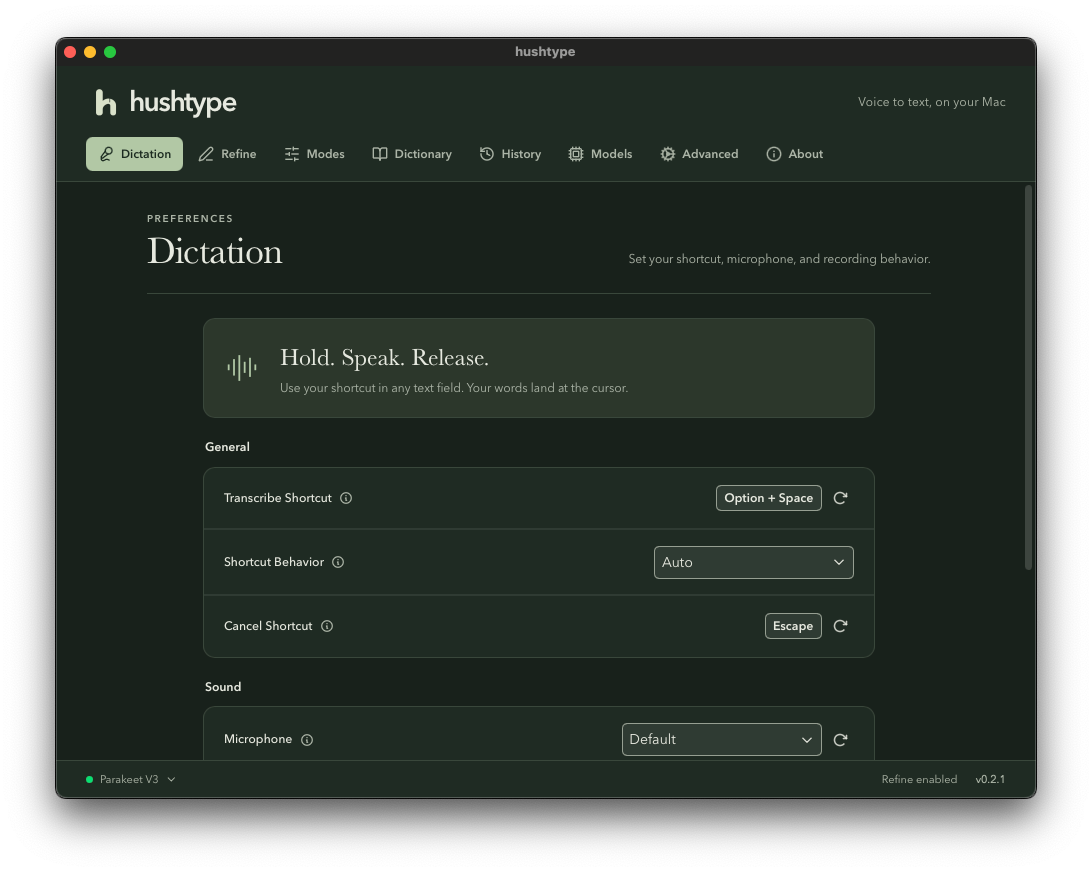
hushtype lives in your menu bar and shows one of four states: idle, listening, transcribing, or refining. Settings are there when you want them, in light or dark.

Install
Paste one line into Terminal. It downloads hushtype and its speech model, checks both, and opens the app.
Press ⌘ Space, type Terminal, and press Return.
curl -fsSL https://hushtype.vercel.app/install.sh
The speech model is 670 MB, so that's the slow part. Terminal shows progress.
When hushtype opens, allow Microphone and Accessibility, then choose Parakeet V3.
Click into any text field, hold ⌥ Space, speak, and let go.
hushtype isn't notarized by Apple yet, so macOS blocks it when a browser downloads it. Files downloaded from Terminal aren't blocked. The installer is short, and you can read it first.
It checks that your Mac is supported, downloads hushtype from this site and the Parakeet V3 model from Hugging Face, and compares every file with its SHA-256 checksum. Then it moves hushtype into Applications and opens it. Nothing else on your Mac changes.
To update, run the same line again. Your settings and model
stay. To uninstall, quit hushtype from the menu bar, delete it
from Applications, and delete the folder
~/Library/Application Support/dev.hushtype.app.
Platforms
Available now
Apple silicon, macOS 14 or later.
Coming soon
Windows support is on our list.
On the way
An iPhone version is in the works.
FAQ
Dictation does. Only cleanup needs a connection, and only to the server you set. Run Ollama on your Mac and nothing leaves it at all.
Parakeet V3 covers 25 languages: Bulgarian, Croatian, Czech, Danish, Dutch, English, Estonian, Finnish, French, German, Greek, Hungarian, Italian, Latvian, Lithuanian, Maltese, Polish, Portuguese, Romanian, Russian, Slovak, Slovenian, Spanish, Swedish, and Ukrainian. It detects the language by itself.
Install Ollama, then run
ollama pull qwen3:8b. hushtype already points at
Ollama on your Mac. For any other OpenAI-compatible server,
enter its address, key, and model in Refine settings.
macOS requires it for an app to paste into other apps and to hear your shortcut while another app is in front. hushtype also uses it to read the front window's title and web address to pick a mode. It reads selected text only if you turn that on for a mode.
Yes, in Dictation settings. By default a quick tap of ⌥ Space also works: tap once to start, tap again to stop.
macOS ties that permission to the exact build of an app. Open System Settings, Privacy & Security, Accessibility, and turn hushtype on again.